
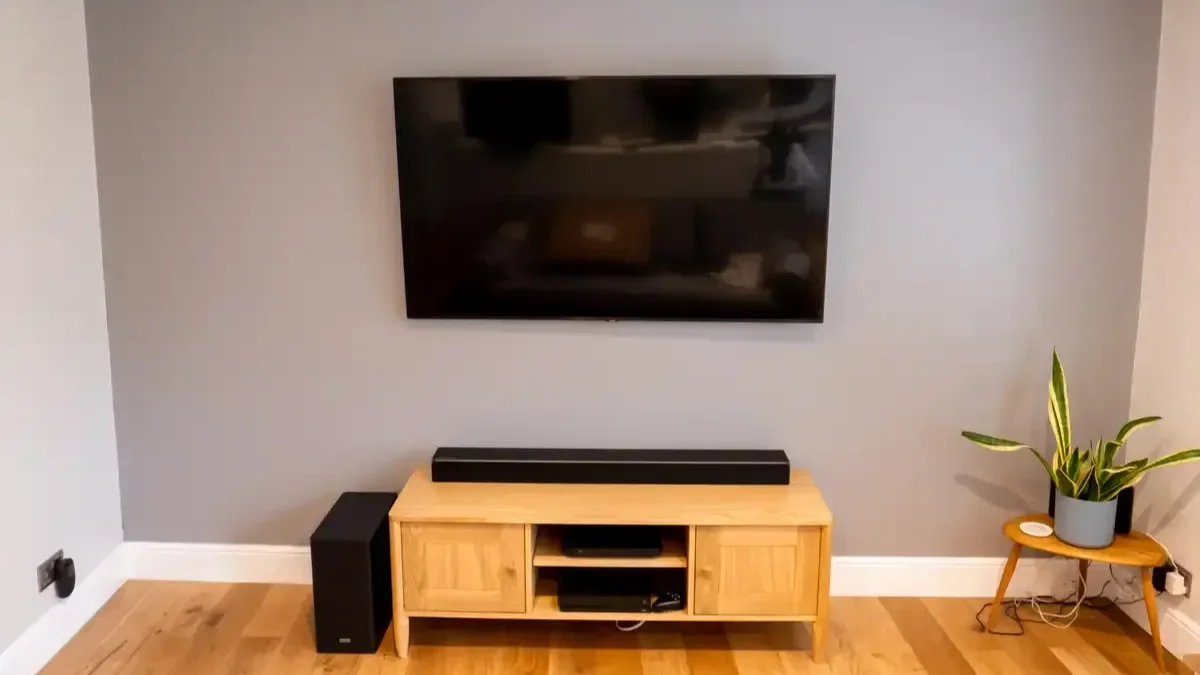
Mounting a television on the wall can make a room look cleaner, create a better viewing setup, and free up valuable furniture space. But a successful TV wall installation starts well before the mounting bracket touches the wall.
Before mounting a TV, you need to check the wall structure, mounting surface, TV size and weight, bracket compatibility, viewing height, power access, cable routing, and the location of studs or other suitable structural support. You should also consider whether the wall contains plumbing, electrical wiring, or other hidden utilities.
A few minutes of planning can prevent common problems such as an improperly supported television, visible cables, uncomfortable viewing angles, or a mount that does not fit the TV correctly.
This guide explains exactly what to check before mounting a TV on a wall, including considerations for drywall, brick, concrete, fireplaces, large televisions, cable management, and Smart TV connections.
Check the Wall Before Installing Anything
The first step is determining whether the wall can safely support the television and mounting hardware. Not every wall has the same structure, and the correct installation method depends heavily on the material behind the surface.
Identify the Wall Material
Common wall surfaces include:
Drywall over wood studs
Drywall over metal studs
Plaster
Brick
Concrete
Stone
Tile-covered walls
A standard drywall surface should not automatically be treated as sufficient structural support for a television. In many installations, the mounting hardware needs to connect to structural framing behind the wall rather than relying solely on the drywall.
For brick and concrete walls, the appropriate masonry anchors and mounting hardware are different from those used for wood-framed drywall.
Locate the Wall Studs
If the wall is framed with wood studs, locate the studs before drilling.
A stud finder can help identify their position, but measurements should be verified before installation. Electrical outlets, switches, doors, windows, and visible framing patterns can sometimes provide clues about stud locations, but they should not replace proper verification.
The mounting bracket should be positioned so its structural attachment points provide adequate support.
Check for Hidden Wiring and Plumbing
Before drilling into a wall, consider what may be located behind it.
Electrical wiring, plumbing, HVAC components, and other utilities can run through wall cavities. Avoid assuming that an empty-looking section of drywall is safe to drill.
Pay particular attention to areas near electrical outlets, switches, plumbing fixtures, and other utility points. If you are uncertain about what is behind the wall, stop and investigate before making any holes.
Check the TV's Size and Weight
The television itself determines many of the installation requirements.
A 43-inch TV and an 85-inch TV may both use a wall mount, but the bracket, wall attachment, handling requirements, and installation approach can be very different.
Measure the TV
Confirm the TV's actual dimensions before deciding where to install it.
Check:
Width
Height
Screen size
Overall depth
Weight
VESA mounting pattern
Location of ports
Location of power connection
Do not rely only on the advertised screen size. A television's stated size, such as 65 inches, refers to the diagonal screen measurement rather than its overall width and height.
Knowing the physical dimensions helps you determine whether the television will fit comfortably within the available wall space.
Check the TV Weight
Every wall mount has a maximum supported weight. Your TV should fall comfortably within the mount's specified capacity.
Never assume that a bracket designed for a particular screen size automatically supports every television of that size. Two TVs with the same screen size can have significantly different weights and mounting configurations.
Confirm the VESA Pattern
The VESA pattern is one of the most important compatibility details to check before buying or installing a TV wall mount.
VESA refers to the standardized spacing between the mounting holes on the back of many televisions. The measurements are generally expressed in millimeters, such as 200 × 200, 400 × 400, or 600 × 400.
Match the Mount to the TV
Check the television manufacturer's specifications for the VESA mounting pattern and compare it with the wall mount's supported patterns.
You should also verify:
Maximum TV weight
Supported screen sizes
Mounting-hole compatibility
Required screw size
Mounting depth
Tilt or swivel range
A mount that physically looks large enough is not necessarily compatible with the TV.
Consider the Type of Mount
Different rooms call for different mounting styles.
Fixed mounts keep the television close to the wall and are suitable when the viewing position is straightforward.
Tilting mounts allow the screen to angle downward or upward, which can be useful when the TV is installed higher than normal.
Full-motion mounts allow the television to extend, swivel, and tilt. They can be useful in rooms where people watch the TV from multiple seating positions.
If you are unsure which bracket fits your space, check out our detailed guide on what type of TV wall mount is best for a living room.
Choose the Right TV Mounting Height
TV height affects comfort more than many homeowners expect.
A television that is mounted too high can force viewers to constantly look upward. One mounted too low may interfere with furniture or create an awkward viewing position.
Consider the Main Seating Position
Start by identifying where people will normally sit.
From there, consider the center of the screen rather than simply measuring from the floor to the bottom edge of the TV.
For a typical living room installation, a comfortable viewing position is often more important than achieving a specific universal measurement.
Your sofa height, screen size, room layout, and personal preference all affect the ideal placement. For an in-depth breakdown of calculations and viewing angles, read our practical guide on how high a TV should be mounted for comfortable viewing.
Account for Furniture
Measure the furniture beneath the TV before choosing the final height.
For example, if the television will be mounted above a media console, leave enough visual and physical space between the furniture and screen. Make sure doors, drawers, speakers, and decorative objects will not interfere with the installation.
Check Viewing Distance and Screen Position
Wall mounting is not only about getting the television onto the wall. The screen should also be positioned appropriately for the room.
Look at the Viewing Angle
Sit in the primary viewing location and look toward the proposed TV position.
Check whether the screen will be:
Directly in front of the main seating
At a comfortable height
Free from major obstructions
Easy to view from common seating positions
A full-motion mount may be useful if the television needs to serve more than one seating area.
Consider Sunlight and Room Lighting
Look for windows, skylights, lamps, and other sources of light that could create reflections on the screen.
A beautiful wall may not be the best TV wall if afternoon sunlight shines directly across the display.
Before drilling, observe the room at different times of day if possible. Natural light can change significantly between morning and evening.
Check Power and Outlet Placement
One of the most overlooked parts of TV mounting is power access.
Before installing the TV, determine where the existing electrical outlet is located and how the power cable will reach it.
Avoid Stretching or Exposing Power Cables Improperly
The TV's power cord should not be placed in a way that creates a trip hazard, hangs visibly across the wall, or is installed in an unsafe manner.
If you want a completely clean appearance, cable management or an appropriately installed outlet may be necessary.
Electrical work inside walls should be handled according to applicable electrical requirements and by a qualified professional when required.
Plan Around the TV's Power Connection
Different TVs have their power connections in different locations.
A wall mount may position the TV very close to the wall, so make sure the power connection has adequate clearance and is not being forced against the bracket.
Plan Cable Management Before Mounting
Cable management should be planned before the television is installed, not treated as an afterthought.
A wall-mounted TV can look much cleaner when HDMI, Ethernet, audio, and other cables are organized properly.
Identify Every Cable You Need
Before mounting, make a list of the devices that will connect to the TV.
This may include:
Cable or satellite equipment
Streaming devices
Gaming consoles
Blu-ray players
Soundbars
AV receivers
Ethernet connections
Antennas
External speakers
Knowing what needs to connect to the television helps determine where cables should run.
Decide Between Visible and Concealed Cables
Visible cable channels can provide a clean solution without opening the wall.
For a more integrated appearance, cables may be routed through appropriate in-wall pathways where permitted and where the cable type and installation method are suitable.
Do not simply push ordinary power cords into the wall. In-wall power and low-voltage wiring have different requirements, and the correct products and installation methods should be used.
Check Soundbar and Speaker Placement
If you plan to install a soundbar with the television, decide its position before mounting the TV.
A soundbar may sit directly below the screen, attach to the wall, or use a mount designed to move with a full-motion TV bracket. Proper soundbar installation ensures clean audio integration and seamless wire hiding.
Measure the Available Space
Check the width and height of the soundbar relative to the television.
Make sure it does not block the TV's infrared receiver, screen, controls, or important ports.
Also consider how the soundbar will connect to the television. HDMI ARC or eARC, optical audio, Bluetooth, and other connection options may be available depending on the equipment.
Check Smart TV and Network Requirements
Modern televisions often depend on reliable network connectivity for streaming, software updates, apps, and other features.
Before mounting a Smart TV, decide whether you will use Wi-Fi or a wired Ethernet connection.
Plan for Ethernet if Needed
If the TV is located far from the router or Wi-Fi performance is inconsistent, a wired network connection may be worth considering.
Structured network wiring can be planned alongside the TV installation so that Ethernet cables do not create unnecessary clutter.
This is especially useful for home offices, media rooms, commercial spaces, conference rooms, and other installations where dependable connectivity matters.
Be Careful With Fireplace Installations
Mounting a TV above a fireplace requires additional planning.
The area above a fireplace may experience heat that is unsuitable for certain electronics. The height of the installation can also create an uncomfortable viewing angle.
Check Heat Exposure
Before placing a TV above a fireplace, determine whether the wall surface and surrounding area remain within an acceptable temperature range for the television.
The fireplace manufacturer's requirements and the TV manufacturer's installation guidance should both be considered.
Consider Viewing Height
Even if the wall can physically support the television, the position may be higher than ideal for normal seating.
A tilting mount can sometimes improve the viewing angle, but it does not eliminate concerns about excessive height or heat.
Check Special Wall Surfaces
Not every TV mounting project involves standard drywall.
Brick Walls
Brick can provide a strong mounting surface when the correct masonry hardware and drilling methods are used.
The condition of the brick and mortar should be evaluated before installation. Avoid assuming that every point on an older masonry wall is equally suitable for mounting.
Concrete Walls
Concrete generally requires masonry-compatible anchors and tools.
The installer must determine the appropriate attachment points and hardware based on the wall and mount requirements.
Tile Walls
Tile requires careful drilling to avoid cracking the surface. The installer must also account for what is behind the tile, such as cement board, drywall, or masonry.
The correct bit, mounting location, and drilling technique matter.
Check Access to TV Ports
Once the TV is mounted, some ports may become difficult to reach.
Before installation, identify where HDMI, USB, Ethernet, optical audio, antenna, and other connections are located.
Think About Future Devices
You may not own every device you will eventually connect.
Leave reasonable flexibility for future upgrades such as a new gaming console, streaming device, soundbar, or receiver.
A little planning can prevent the need to remove the television simply to reach a port later. If you ever need to replace your set or move to a new home, professional TV removal or TV reinstallation and relocation can protect both your wall and equipment.
Check for Common Installation Problems
Several mistakes repeatedly cause frustration with wall-mounted televisions.
Mounting Directly Into Drywall Without Adequate Support
Drywall anchors are not automatically appropriate for every TV installation. The required support depends on the wall construction, television weight, mount design, and attachment method.
Choosing a Mount Based Only on TV Size
Screen size alone does not establish compatibility. Weight, VESA pattern, mount type, and wall structure also matter.
Ignoring Cable Routing
Installing the TV first and figuring out the cables afterward can result in visible wires and unnecessary rework.
Mounting Too High
A television may look impressive when mounted high on a wall, but visual appearance should not take priority over comfortable viewing.
Forgetting Future Upgrades
If you install only enough cable capacity for today's equipment, future changes may require additional work.
A Simple Pre-Mounting Checklist
Before drilling any holes, confirm the following:
The wall material has been identified.
Suitable structural support has been located.
Hidden wiring and plumbing have been considered.
The TV's dimensions and weight are known.
The VESA pattern has been confirmed.
The wall mount supports the TV.
The mounting height has been planned.
The primary viewing position has been considered.
Power access has been checked.
Cable routing has been planned.
Soundbar placement has been considered.
Network connectivity has been planned.
TV ports will remain accessible.
Windows and lights will not create major glare.
The installation surface is appropriate for the selected hardware.
If any of these points are uncertain, it is better to resolve the issue before installation rather than after the television is on the wall.
When Professional TV Mounting Makes Sense
A professional installation can be particularly useful when the project involves a large or heavy television, unusual wall construction, concealed wiring, a fireplace, a full-motion mount, multiple connected devices, or network wiring.
An experienced team specializing in complete TV setup and installation can assess the wall, select appropriate mounting hardware, position the TV accurately, manage cables, and integrate related equipment such as soundbars and Smart TV devices.
Professional TV mounting is also useful for commercial spaces where televisions may be installed in offices, conference rooms, waiting areas, restaurants, retail environments, or other customer-facing locations. Learn more about our team or visit our main site at TV Mounting Dallas to see how we assist local homeowners.
For homeowners, the main benefit is not simply getting the television onto the wall. Proper planning helps create an installation that is secure, visually clean, accessible, and suited to the room.
Final Takeaways Before Mounting Your TV
The safest and cleanest TV wall installations begin with preparation.
Before mounting a television, verify the wall structure, identify appropriate attachment points, confirm TV and mount compatibility, choose a comfortable viewing height, and plan power and cable connections.
You should also consider lighting, soundbar placement, network connectivity, future devices, and access to the television's ports.
A wall-mounted TV should fit the room rather than simply occupy an empty section of wall. Taking time to plan the installation can help avoid unnecessary drilling, cable clutter, poor viewing angles, and compatibility problems.
For common questions, read through our detailed FAQ page, or explore more expert tips on our official blog page. For complex installations, particularly those involving large TVs, masonry walls, fireplaces, concealed wiring, soundbars, or network connections, professional TV mounting can provide an efficient way to handle the details correctly.
Frequently Asked Questions
1. What should I check before mounting a TV on a wall?
Check the wall material, structural support, stud locations, TV weight, VESA pattern, mounting bracket compatibility, viewing height, power outlet location, cable routing, and potential hidden wiring or plumbing. Also consider glare, soundbar placement, network connectivity, and access to the TV's ports.
2. Can I mount a TV directly onto drywall?
A television should not automatically be mounted using drywall alone. The appropriate attachment method depends on the TV's weight, mounting hardware, wall construction, and available structural support. For many drywall installations, connecting the mount to suitable framing provides the necessary support.
3. How do I know if my TV wall mount fits my TV?
Check the TV's VESA mounting pattern, weight, and dimensions against the specifications of the wall mount. The mount should support the TV's weight and accommodate its VESA pattern. Screen size by itself is not enough to establish compatibility.
4. How high should a TV be mounted on the wall?
There is no single height that works for every room. The ideal position depends on seating height, TV size, room layout, and viewing habits. In many living rooms, positioning the center of the screen near a comfortable seated eye level is a useful starting point.
5. Can I mount a TV above a fireplace?
A TV can sometimes be installed above a fireplace, but heat exposure, wall construction, manufacturer requirements, and viewing height must all be considered. The location may also place the television higher than is comfortable for normal viewing.
6. How can I hide cables behind a wall-mounted TV?
Cable concealment can involve surface raceways or properly installed in-wall pathways, depending on the type of cable and wall construction. Power cords should not simply be placed inside a wall. Electrical and low-voltage wiring have different installation requirements.
7. Should I install the soundbar before or after mounting the TV?
It is best to plan both positions together. The TV and soundbar should have enough clearance, and their connection cables should be considered before the TV is secured to the wall. This helps prevent awkward placement and unnecessary cable rework.
8. What should I check before mounting a Smart TV?
Besides the wall and mount, check Wi-Fi or Ethernet availability, power access, HDMI connections, streaming devices, sound equipment, and the location of the TV's ports. Planning network and entertainment connections beforehand can make the finished installation cleaner and easier to use.
9. Can a large TV be mounted on any wall?
Not necessarily. Large TVs can be heavier and may require a suitable wall structure, compatible mounting hardware, and careful installation. The wall material, structural support, TV weight, VESA pattern, and mount specifications should all be verified before installation.
10. Is professional TV mounting worth it?
Professional TV mounting can be worthwhile when the installation involves a large television, difficult wall surface, concealed cables, a fireplace, full-motion hardware, soundbar installation, or network wiring. Proper planning and installation can help produce a secure, aligned, and cleaner-looking result.